
Amazon India Main Image Requirements: White Background, 85% Rule and Image Size
Published on 29 Oct 2026
Amazon is strict about the main product image. Learn the pure white background rule, the 85 percent fill guideline, image size for zoom, and how to prepare your photos in bulk.
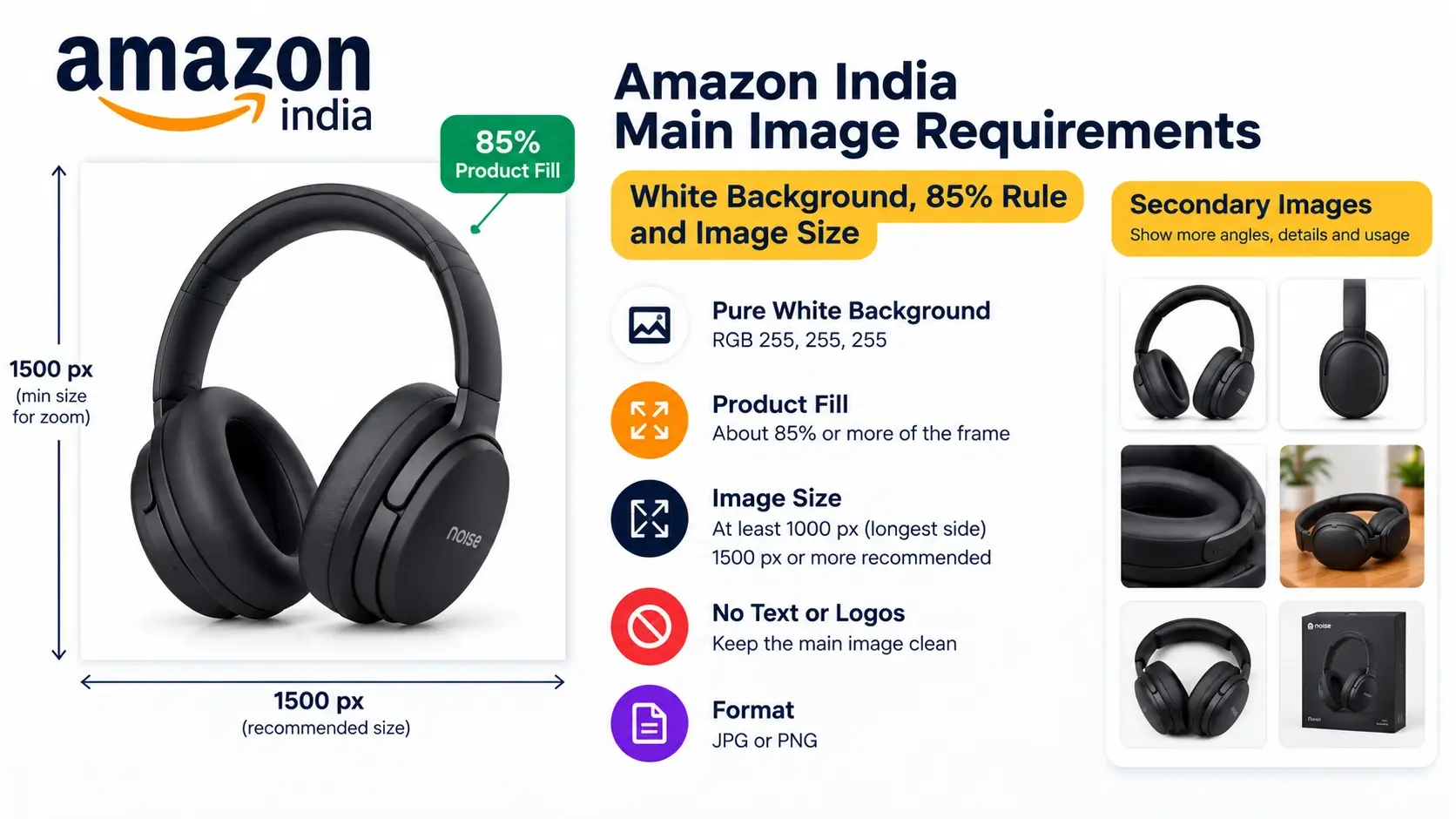
Of all the big marketplaces, Amazon is the one that sellers usually find the strictest about photos, especially the main image. A slightly gray background, a tiny logo in the corner or a product that fills too little of the frame can be enough to get an image flagged or a listing suppressed. The good news is that the rules for the main image are clear and easy to follow once you know them.
This guide explains the main image rules sellers commonly follow on Amazon India: the pure white background, the 85 percent fill guideline, image size for zoom, what is allowed on secondary images, and how to prepare an entire folder of photos fast with our free marketplace image resizer.
Last updated: October 30, 2026. Amazon's image rules can differ by category and change over time. Always check the style guide for your category in Seller Central before you upload.
Amazon India main image: the quick answer
ItemWhat sellers commonly followBackgroundPure white (RGB 255, 255, 255)Product fillThe product fills about 85 percent or more of the frameImage contentThe actual product only, professionally lit and in focusText, logos, watermarks, bordersNot allowed on the main imageSize for zoomAt least 1000 px on the longest side is commonly recommendedFormatJPG or PNG are the usual choices
Category rules can add to or change these. For example, clothing and some other categories have extra requirements about models, angles and how the product is shown. Treat the table as the general rule and check your category's guide for exceptions.
The pure white background rule
Amazon's main image rule most people notice is the white background. It is not "roughly white" or "light gray". It is pure white, which means the color values are 255 for red, 255 for green and 255 for blue.
That sounds technical, but it matters because it is why many sellers' images look slightly dirty on Amazon. A photo taken on a white bedsheet usually has a background that looks white to your eye but is really a light gray or cream. Shadows, uneven light and phone processing all push the background away from pure white.
How to get a truly white background
- Light the background evenly. Use soft daylight from a window, and put the background sheet in a place without strong shadows.
- Use a bright, plain sheet or paper without wrinkles, and keep the product a bit away from it so it does not cast a heavy shadow.
- Slightly overexpose rather than underexpose. A slightly bright photo is easier to clean up than a dark one.
- Clean the remaining background. Software can turn a light off-white or light gray background pure white. Our resizer has an option called "Make a light background pure white" for exactly this, and it only affects light areas connected to the edge of the photo, so white areas inside your product are left alone.
- Verify. After processing, check a few photos. You can use an eyedropper tool in any photo editor to read the background color, and the result cards in our tool also tell you whether the edges are white.
One note: JPG compression can slightly change colors in some cases. At high quality settings, a flat white background normally stays white, which is why our tool starts at high quality and only lowers it if it needs to fit your size limit.
The 85 percent rule
Amazon wants the product to take up most of the image. The commonly cited guideline is that the product should fill about 85 percent or more of the frame. The point is that buyers can see the product clearly even on a small phone thumbnail, and a tiny product floating in white space looks unprofessional.
In practice, "85 percent" is about the longest side of the product compared with the frame. So a tall bottle should nearly reach the top and bottom, and a wide bag should nearly reach the left and right.
How to hit about 85 percent
- When shooting, move the camera closer so the product fills the frame, but leave a small margin so nothing is cut off.
- When resizing, use a fill setting around 85 percent. In our tool, the Amazon India preset starts at 85 percent and shows you the measured fill for each result.
- Use the option to remove extra empty border around the product, so photos with a lot of empty space are tightened before they are placed on the white canvas.
Image size and the zoom feature
Amazon shoppers can zoom in on product images on the website when the image is large enough. A commonly recommended minimum is 1000 pixels on the longest side. Many sellers go larger, such as 1500 or 2000 pixels, so images stay sharp when zoomed. The starting preset in our tool is 1500 x 1500 px for Amazon India, which is comfortably above the zoom threshold.
A bigger image is not always better. Very large files are slower to upload and may be unnecessary. A square 1500 x 1500 px image is a good balance for most catalogs, but if your category's guide asks for something else, change the size in the tool.
What is not allowed on the main image
The main image is the cleanest one in your listing. Sellers generally avoid all of these on it:
- Text, offers, badges such as "Best seller" or "Free delivery"
- Logos and watermarks (unless the logo is a real part of the product itself)
- Borders, frames, color blocks and graphics
- Extra props, accessories or items that are not included in the sale
- Multiple views or collages in one image
- Drawings or illustrations instead of the real product
- Mannequins, hangers or hands that distract (in some categories, models are allowed, so check your category guide)
What you can do on secondary images
Secondary images are where you show everything else. Rules are more relaxed, which gives you room to explain, persuade and answer questions.
- Different angles: back, sides, top and inside.
- Close-ups: fabric, material, print, buttons, ports, textures.
- Lifestyle photos: the product in a real setting, in use or worn by a model.
- Infographics: short text and icons showing features, dimensions, sizes or what is in the box.
- Size and scale: measurements or comparison with a familiar object.
- Packaging and contents: what the buyer receives.
Lifestyle and model photos keep their own background, so crop them to the frame rather than adding white bars. In our tool, choose "Crop to fill the frame" for these, and use the top focus for standing models so heads are not cut.
How to prepare Amazon India photos in bulk
You can prepare all your photos for Amazon, and for other marketplaces at the same time, with the free Marketplace Image Resizer. It runs entirely in your browser, so your photos are not uploaded to a server.
Step 1: Add your photos
Choose photos or a whole folder. JPG, PNG and WebP are supported. Convert HEIC files from iPhones to JPG first.
Step 2: Select Amazon India
The starting values are 1500 x 1500 px and about 85 percent fill. Edit them if your category requires something different.
Step 3: Choose the fit mode and cleanup
- For single products on plain backgrounds, use white space (or Automatic) and keep both cleanup options turned on: remove extra border and make the light background pure white.
- For model and lifestyle photos, choose "Crop to fill the frame". These are for secondary images, since they keep their own background.
Step 4: Check each result
Look at the size, the file size, whether the background is white and how much of the frame the product fills. If a card shows a warning, adjust the settings or retake the photo.
Step 5: Download
Download each photo or all as a ZIP. Upload the clean white-background images as your main images and the cropped lifestyle images as secondary images.
Common mistakes on Amazon product images
- Off-white or gray backgrounds. The most common problem. Check the background and clean it.
- Product too small in the frame. Fill the frame closer to 85 percent.
- Badges and text on the main image. Move them to secondary images, where infographics are allowed.
- Shadows and reflections that look dirty. A tiny natural shadow is fine, but heavy gray patches on the white background are a problem.
- Cropped product edges. Leave a small margin so no part is cut.
- Low resolution. Small images cannot zoom, which makes the listing look weaker.
- Different styles for variations. If a product comes in different colors, keep the angle, size and lighting consistent across them.
- Watermarks from social media versions. Do not reuse a branded image as the main image.
Keep your branded copies separate
It is fine to have branded or watermarked images for Instagram, your own website or WhatsApp, as long as the Amazon main image stays clean. Make the branded versions separately with the bulk watermark adder, and see our guide on how sellers can protect product photos for a safe workflow.
Beyond the photos: other documents sellers need
Good images are only one part of running a store. When customers order directly from you, such as on your own website or WhatsApp, you will also need clean paperwork. The free Invoice Creator helps you generate a simple invoice quickly. Always check the invoicing rules that apply to your business.
Amazon vs Flipkart and Meesho
Amazon's main image rules are stricter than most other marketplaces, especially the pure white background. If you sell on multiple platforms, compare the rules in our guides on Flipkart image size and requirements and Meesho product image size. Then prepare one set of photos for each marketplace at the same time.
Pre-upload checklist
- The main image shows only the real product on a pure white background.
- The product fills about 85 percent of the frame, with a small margin.
- No text, logos, badges, borders or watermarks on the main image.
- The image is at least 1000 px on the longest side, ideally larger.
- The photo is sharp, well-lit and not stretched.
- Lifestyle and infographic images are used as secondary images.
- You have checked your category's style guide in Seller Central.
Frequently asked questions
What background color does Amazon require for the main image?
Pure white, which is RGB 255, 255, 255. A background that only looks white may not be pure white, so check it.
How much of the frame should the product fill?
The commonly cited guideline is about 85 percent or more of the frame, measured along the longest side of the product.
What size should Amazon product images be?
At least 1000 pixels on the longest side is commonly recommended for zoom. Many sellers use 1500 x 1500 px or larger.
Can I add text or a logo to the main image?
No. Keep the main image clean. Use infographics and branded graphics in secondary images, following your category rules.
Can I use lifestyle photos on Amazon?
Yes, as secondary images. The main image should be the plain product on white.
Which file format is best?
JPG or PNG are the usual choices. JPG keeps files light for photos.
Do the rules differ by category?
Yes. Clothing, jewelry, books and other categories may have extra or different requirements. Check the style guide for your category.
Can I prepare images for Amazon, Flipkart and Meesho at once?
Yes. Select all the marketplaces in the tool and download a separate set for each one in a single ZIP.
Are my photos uploaded when I use the tool?
No. The resizer works in your browser, so your photos stay on your device.
Final thoughts
Amazon's main image rules are strict but simple: a pure white background, the real product only, about 85 percent of the frame, no text or logos, and enough resolution for zoom. Get these right and your listing looks professional from the first click. Keep your branded and lifestyle images for secondary slots and other channels, and always confirm the latest requirements for your category in Seller Central.
To get your photos ready, open the free marketplace image resizer, select Amazon India, add your folder and check the white background and fill in the results. For more seller guides, visit the Instant Convert Tools blog.